Monday, July 11, 2016

Reflection Blog Post #5

Today, I'm going to talk about Trello and it's capabilities as a communication tool. Matt actually shared Trello with me on one of my other posts, needless to say I checked it out and I liked it. I have not actually used it in the classroom, but Brian, Chad, and I created a board earlier and sharing images and information was quick and easy.


So here is what Trello does:

  • Provides boards for organizing information, kind of similar to Pinterest
  • Can act as a to-do list for tasks for a group
  • Allows users to share information, images, links, etc. with other team members
  • Boards can be organized into groups, color-coded, and labeled
  • One cool feature that I liked was the ability to add a checklist on a board.                                                
So, it really is kind of like Pinterest for putting tasks into action. I would have used this for my leadership class this past year if I had known about it. Our leadership class was an extension of student council and the class was in charge of all of the student body activities. All of these activities were executed by committees and the biggest problem we ran into was communication. This tool would have allowed students to create tasks, see when they were completed, and add to the list so that all students can see the updates. It could have also been a tool for quick assessment as we could have seen who did what to ensure that all students were active in the planning and execution of the activity. This could be used for any collaborative work where students need to track their progress and monitor their group's work.

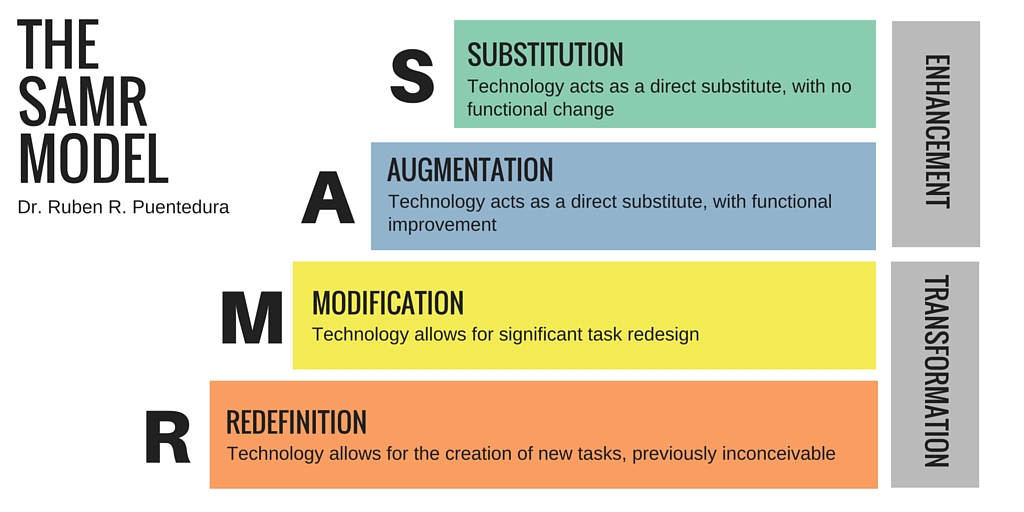
As far as SAMR, I don't think this completely redefines classroom learning. I do think it can serve as substitution, augmentation, and modification. It provides a new and improved forum for collaborative projects and it changes the way that students can interact. This program is easy to use and I think I would use it for a more complex group project


Thursday, July 7, 2016

Reflection Blog Post #4


PADLET: Padlet (www.padlet.com) is a great tool for collaboration, formative assessment, and student voice. This is an app I have actually used a few times in my classroom and I love it, and here's why:

  1. It's super easy to use. You can figure it out in a matter of minutes. It also takes little set-up and is easy for students to learn and use. Once you create a Padlet, all you have to do is provide the link. Click here to check out one I created for you: EDUC 538 Padlet Try making a post, click on the plus-sign in the bottom right corner.
  2. Padlet is basically an online bulletin board where students can post whatever they want (text, links, images, videos...). 
  3. Students are able to share thoughts and ideas and they love it. It can be difficult to hear from all students and this is excellent for viewing their feedback all at once. This is the formative assessment piece, there aren't a lot of tools this simple where you can assess so quickly.
  4. Posts are anonymous, but if needed, you can have them add their names.
Padlet is versatile and easy, I like to use it for entry tasks and for sharing group work. As far as SAMR is concerned, here are some ideas of how Padlet could be used to reach each criteria:
  • Substitution: Switching Padlet for answering an entry task in a notebook 
  • Augmentation: Continuing from the example for substitution, after answering an entry task, responding to other posts in lieu of discussion
  • Modification: Providing a forum for students to post multimedia research while completing group work. Students can see, share, and work from any device with internet capability. 
  • Redefinition: Learning can be transformed because they can build on each other's thinking and research from anywhere. It can function similarly to realtimeboard.com in that students could post graphics which synthesize their learning and have a forum for meta-cognition.
I know I will continue to use this app in my classroom, I recommend checking it out if you haven't already. Here is a video of how to use Padlet:

Thursday, June 30, 2016

Reflection Blog Post #3


Image result for evernote One tool that I looked at yesterday that I think could be useful both for planning and learning is Evernote. Evernote is a place to store notes and keep them organized in notebooks so you don't forget (hence the elephant). You can find Evernote here: https://evernote.com/

As a teaching tool, my favorite component within Evernote is the web clipper. With the web clipper, you can select an image or excerpt and add annotations (notes, highlighting, underlining, circling, etc.). Check out the image below: The have clipped an article, circled "At Work," added the green check mark, highlighted Benjamin Franklin's quote, added the arrow for emhasis, and blurred the image in the sidebar. As far as the SAMR model, it can be used more in the substitution or augmentation of learning as an enhancement. I think it can be used to add a creative and individualized way to gather data for students; however, I don't see it is a transformative tool for modifying or redefining learning. What do you guys think?


For planning, it's always nice to be able to save articles or images we see online that might be good for classroom instruction in an organized manner. In this regard, Evernote is very similar to Pinterest. You can save notebooks like the boards on Pinterest. Unlike Pinterest, you can keep track of more than just "pins." Evernote is designed to keep track of notes, reminders, planning, and other materials; plus, you can share your notes and notebooks with other users. While it's a good tool for planning, I think the gold in Evernote is the ability to show students how to annotate a text and share online materials with them. Students would be able to conduct online research and share with you or their classmates their notes, thinking, and progress; this falls into the learning and communicating facets of education.


Also, there's an app! I have it on my phone now, anything I can access and use to full effect from my phone or iPad immediately becomes something I'll actually try to use. That may sound weird, but I spend very little time at my laptop and tons of time with my phone, for instance, when I'm sitting watching the girls at gymnastics, I do not lug my laptop along with me and their stuff. I will for sure have my phone and maybe my iPad, and I can usually get a solid 30-45 minutes of work done while I'm sitting there.  And it has a chat feature, which could be good for collaborating and sharing work with other teachers....students could chat with other students through the app, hopefully that wouldn't become a distraction for them though.

I think this is something I will try to incorporate in my planning mostly to keep track of articles, images, etc. that I might want to use in future lessons. For me, note-taking and data-gathering is a huge part of a language arts and social studies classroom, so I will use it for annotating purposes as well. How might you use this in your classroom? Or for personal use? I am already filling my Evernote with Chloe's birthday party plans... ;)


Thursday, June 23, 2016

Reflection Blog Post #2


1. How can the SAMR model assist you in integrating with intention?

In this YouTube video, I like the list where it shows ways that you should and should not want to use technology in the classroom. Here is a list of some of the shoulds:
+ Make Prezis
+ Start Blogs
+Create Wordles

And here are some of the should nots:
+ Raise Awareness
+ Start Conversations
+ Find Answers (To Their Questions)

This is the kicker to me:

What's important here is... the level of student engagement in LEARNING, not the tool.

There have been times where I think a tool is so fun and exciting, and oh, wouldn't that be engaging for my students... It might be fun and exciting and engaging, but how does it engage them in learning? This is the heart of integrating with intention; finding tools that substitute, augment, modify, and redefine the process to enhance and transform learning. We have to use tools to serve a specific purpose which improves learning, and, therefore, warrants the time spent teaching the tool.

2. Which analogy for the SAMR model do you find most helpful? Explain why.

I like this Starbucks analogy, seems appropriate since we are in Washington:


This is helpful to me because it shows the enhancement or transformation of each drink. The images in question #1 and question #3 are more helpful for my overall understanding of SAMR. The scuba diver analogy is equally as helpful as the Starbucks, but I like that the Starbucks drinks are all coffee-based drinks. There's quite the jump to compare a snorkel and a submarine.

3. Which level of SAMR can you see yourself using most? Explain why.

I think it's safe to say that I will use substitution the most as it is something I do frequently already. Last year I taught in a classroom where we had a classroom set of Chromebooks, which I know you all know, and this coming year I will be again (yes!). We provided online texts all the time because we were able to share primary sources and secondary sources and include a variety of texts to enhance their learning. Augmentation occurred often as well as we shared documents via the Google Suite and students engaged in many online tasks. I think we even did some modification and redefinition especially in a unit where the summative assessment was a public service announcement. Without the tools, this project would not have been possible.


Tuesday, June 21, 2016

Reflection Blog Post #1


Reflection Blog Post #1: Media Literacy This first blog post you will do sets the stage for our course. You will view the Frontline video, Digital Nation and we will investigate the topic of Media Literacy in class. Spend a bit more time considering this overarching topic after class. Then, after a bit of research, prepare your blog post to answer three questions.

1. Before these experiences how would you have defined media literacy and how has your understanding begun to change, develop, and/or deepen?

Prior to today's class, I would have said that media literacy was simply being proficient in using a variety of media tools in the classroom. Honestly, I hadn't really heard "media literacy" used very often to wonder or think about what it was on a deeper level. This quote from the NAMLE website hit the importance of media literacy home for me:

In its simplest terms, media literacy builds upon the foundation of traditional literacy and offers new forms of reading and writing.

We spend so much time discussing learning styles, strategies to boost comprehension, and methods to encourage engagement and one solution in front of us is media literacy. The ability to increase options for students to read and write is paramount in today's schools. As we saw in "Digital Nation," students struggle to read and write at length, and from my personal experience, incorporating technology aids in students' engagement and performance.


2. What is the state of our “Digital Nation” and how do you feel about it?

In the society and culture we live in today, students need to be technologically savvy to be productive citizens upon high school and college graduation. Completing college coursework or finding a job that does not deal with a broad range of media skills is nearly impossible. Everyone from business moguls to small business owners to stay at home moms use technology at some level. One of our roles as teachers is to prepare students for college and life as an adult, so I feel we would be remiss as educators to leave media literacy out of our classrooms. I have two first graders, now entering second grade, and they are given opportunities to use computers and tablets in their classrooms, as well as their teachers using tools found online to teach and instruct their classes.

In addition to providing engaging classroom instruction and developing life skills, basic use of technology is needed for standardized testing. One problem with standardized tests as we learned in Dr. Aleccia's class is that students of lower socio-economic tent to be disadvantaged due to less exposure to technology. Also, relating back to question #1, providing students opportunities to read and write in different ways is needed and beneficial to get students up to the standard presented by Smarter Balanced.  In my 7th grade language arts classes, students were presented with various reading samples, audio files, and writing prompts which were/would be easier for them to access with a variety of multi-media exposure in class leading up to the assessment.

Not to sound like a pessimist, but I think even people reluctant to get on the technology wagon need to embrace media literacy with an "if you can't beat them, join them" mentality. The reality is that technology is everywhere, kids are stimulated by it and love using it, and if we don't use it, we're offering antiquated instruction. Why fight what's happening whether we like it or not? I personally enjoy the convenience and connection offered by my electronic devices, so it's reasonable that students would be in the same boat. Time to get on board!

3. (Pose your own third question to yourself based on your research and respond to it—this is the heart of metacognition).

+ How can teachers balance the use of technology in the classroom? What are the concerns and how will they respond to maximize learning?

Obviously, this is a big picture question, and I don't have the answer.  I do have some thoughts. Technology use in the classroom to build media literacy needs to be directed and purposeful. As the history teacher in "Digital Nation" discussed the improvement in learning, he was describing a specific process that led to growth, not a technology free-for-all. The school in "Digital Nation" set the internet access up to block websites such as MySpace and YouTube, which is common, and appropriate. Teachers need to provide clear instruction and guidelines for appropriate internet use; I have never seen students more compliant than when they think they might lose their Chromebook and have to do paper and pencil work. Everything needs to be beta-tested. It may be time consuming, but there is nothing worse than thinking you've planned an amazing lesson using a new app and then finding out it doesn't work the way you want it to. From what I've observed, the key to building media literacy in the classroom is to offer new options for learning while providing the structure and scaffolding for student success.

In my opinion, cell phones should not be used in the classroom. I believe this because it is a classroom management nightmare. For starters, not all students have them and instead of encouraging an equitable learning environment, it draws attention to who has one and who does not. If technology  is being used in the classroom, it needs to be available to all students through a school-issued device. Another reason is that students can turn off the wi-fi (if present) and access anything they want using their data. This is a liability for teachers as they cannot verify the incoming content.  It is too hard to monitor what students are doing on their phones; they could be researching or they could be on Facebook.

***I was fortunate to be in a school that had a no cell phone policy, and I understand that phone usage is determined by school policy; however, this is my personal POV.

Reflection: TEST